Moving quote software: the three kinds a mover can buy.
Moving quote software is the software that gives your customer the quote: a quote your office sends from the CRM, a price range on your own website, or a number built from a video walkthrough of the home. Moving company quoting software is sold in those three kinds, and one mover can run more than one. This page covers what each kind does, what nine CRM vendors publish about quoting, and what to check before you buy.
The three kinds of moving quote software.
- 1
The quote builder inside a CRM.
Your office prices the move in the CRM, and the CRM sends the customer a quote to read and sign. The customer gets the number after somebody at your company has worked on it. If you run a CRM, look there first, because you may already own this kind.
- 2
A quote form on your own website that shows a price.
The customer answers a few questions on your site and sees a price on the spot, worked out from your rates before anyone in your office has seen the request. Some forms sold as quote request software only take the request and send it to the office, and the customer sees no number. Ask which one you are buying.
- 3
A quote from a video walkthrough.
The customer films the home on a phone, or walks it with you on a video call. Software turns the video into an inventory, and the price is worked out from that list and your rates. It asks more of the customer than a short form does, and the number rests on what is really in the home.
Quote software and estimating software are different tools.
Quote software is the customer's side. It decides what number the customer sees, when they see it and how it reaches them: in a quote from your office, on your website, or after a walkthrough.
Estimating software is your estimator's side. It builds the number from the inventory, the cube and weight, and your rates. The kinds of estimating tool, and what each vendor publishes as a price, are in estimating software for movers.
A CRM can carry both sides, which is why the two names get mixed up. The question for any vendor is which side its product covers: building the number, showing it to the customer, or both.
What nine moving CRMs publish about quoting.
We read each vendor's own website on 2026-11-12 and wrote down what it says about three things: whether the customer sees a price on the mover's website, whether the customer can book online with a deposit, and how the video survey is done. The list is in the order of our CRM comparison and is not ranked. MoveBlueprint is not a CRM, so it is not in the table.
| CRM | Price on your website | Online booking with a deposit | Video survey |
|---|---|---|---|
| SmartMoving | Not published. Website forms send the lead in | The customer pays the deposit in the customer portal after the estimate | Through LiveSwitch or QubeSheets, plus its own survey app for your estimator |
| Supermove | Says customers get instant price estimates. Where they show is not stated | Online booking, yes. A deposit at booking is not stated | Your estimator surveys in person or by video in its estimator app |
| Movegistics | Not published. A QR code survey request is marked coming soon | Deposit paid online after the estimate is signed | Built in (HomeSurvey.ai, the same company) |
| Elromco (MoveBoard) | Yes | Yes. The customer signs and pays the deposit on the move the office priced | Not published. The inventory comes from customer photos or a list |
| MoveItPro | Yes, a price range or an exact price | Yes, with a card deposit | Built in. The customer films the home inside the booking form |
| Chariot | Not published. The website form sends a lead | Deposit paid in the estimate signing flow | Through LiveSwitch |
| MoversTech | Not published | Not published. Online payments and payment links | Not published |
| Moverbase | A website form that captures the lead (paid plans) | Not published | Not published |
| Vonigo | Not published for movers | Online booking for any trade. A deposit is not stated | Not published |
Read from each vendor's own website on 2026-11-12. Not published means the pages we read do not say it. It is a question for the demo, and it does not mean no. Found something out of date? Tell us at support@moveblueprint.com and we will correct it.
Read the second column before a demo. A few of these vendors say their software puts a price on the mover's website. Supermove's line is one to ask about, because its pages do not say where the price shows. For the rest, the pages we read describe a website form that sends the lead to the office, or they do not say.
In the booking column, several lines describe a deposit the customer pays once there is an estimate to sign. That is the quote builder at work: the office prices the move first, then the customer signs and pays. Price, contract, crew app and storage for the same nine are in the best CRM for moving companies.
Survey tools, and where the quote gets written.
A video or photo survey tool builds the inventory. Whether it also writes the quote differs from vendor to vendor, so it is the first thing to ask. These are the survey tools we have read, each described from its own site on the date shown.
| Survey tool | What it is | Read on |
|---|---|---|
| HomeSurvey.ai | AI survey sold in survey packs, built by the Movegistics team | 2026-11-04 |
| Virtual Moving Technologies | Photo survey, sold three ways | 2026-11-12 |
| LiveSwitch | Live video call with the customer, plus AI inventory and reports | 2026-11-04 |
| Voxme | Inventory and survey app, priced by the job | 2026-09-23 |
| Yembo | AI survey suite with tariff estimates and e-signature, sales-led | 2026-09-23 |
| ComeHome.ai | Photo estimate widget for a mover website | 2026-09-23 |
| Qubesheets | AI inventory from a walkthrough | 2026-09-23 |
HomeSurvey.ai shows how the work can be split between two products. What its price covers, as we read it on 2026-11-04: The survey and the cube sheet it produces. Quoting, signature and deposit happen in Movegistics. The survey tools are compared one by one in virtual survey software for moving companies.
Where the Smart Quote Form fits, and where a CRM is the better answer.
MoveBlueprint is not a CRM. It makes two of the three kinds: the form on your website and the walkthrough. The quote your customer signs is still written in your CRM. What lands there from us is the lead, the range the customer saw and, after a walkthrough, the inventory. SmartMoving and Supermove take it on their own today. Any other CRM gets it through a connection we build when you sign up.
| If you want | Look at |
|---|---|
| One system for the quote the customer signs, dispatch, billing and crews | A CRM. That is the job of a CRM, and MoveBlueprint is not one. |
| A price on your website from the same vendor as your CRM | A CRM whose own site says it does that. The table above has each vendor's line. |
| A price range on your website while you keep the CRM you run | A quote form that sends each lead into that CRM. The Smart Quote Form is this kind, and it is free. |
| A number built from what is in the home | A video walkthrough. Several of the CRMs and survey tools above have one. Ours is part of the $199 a month plan. |
A CRM is the better answer when you want the whole office in one system, or when the CRM you run already puts a price on your website. A second form on the same site would then be one more thing to keep in step with your rates.
The Smart Quote Form fits when you want to keep your CRM and its website form only sends you the lead. It sits on your site with your logo and shows each customer a price range from your own rates. It is free, with no card and no time limit, and every lead goes to your email and your CRM. On the $199 a month plan the customer can also book a date online with a card hold for your deposit, or film a walkthrough that ends in an inventory and a price range. Every range is an estimate, and the final number is yours.
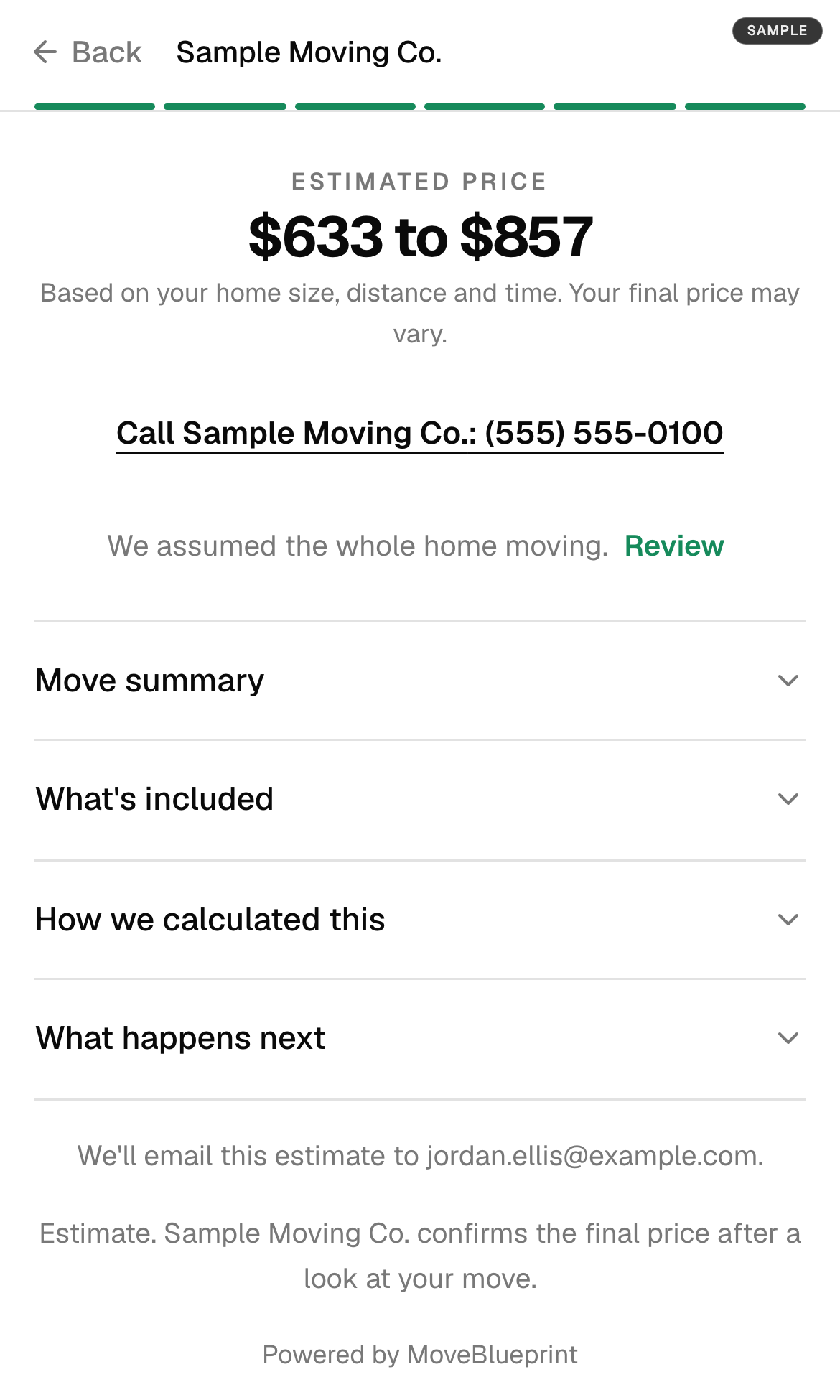
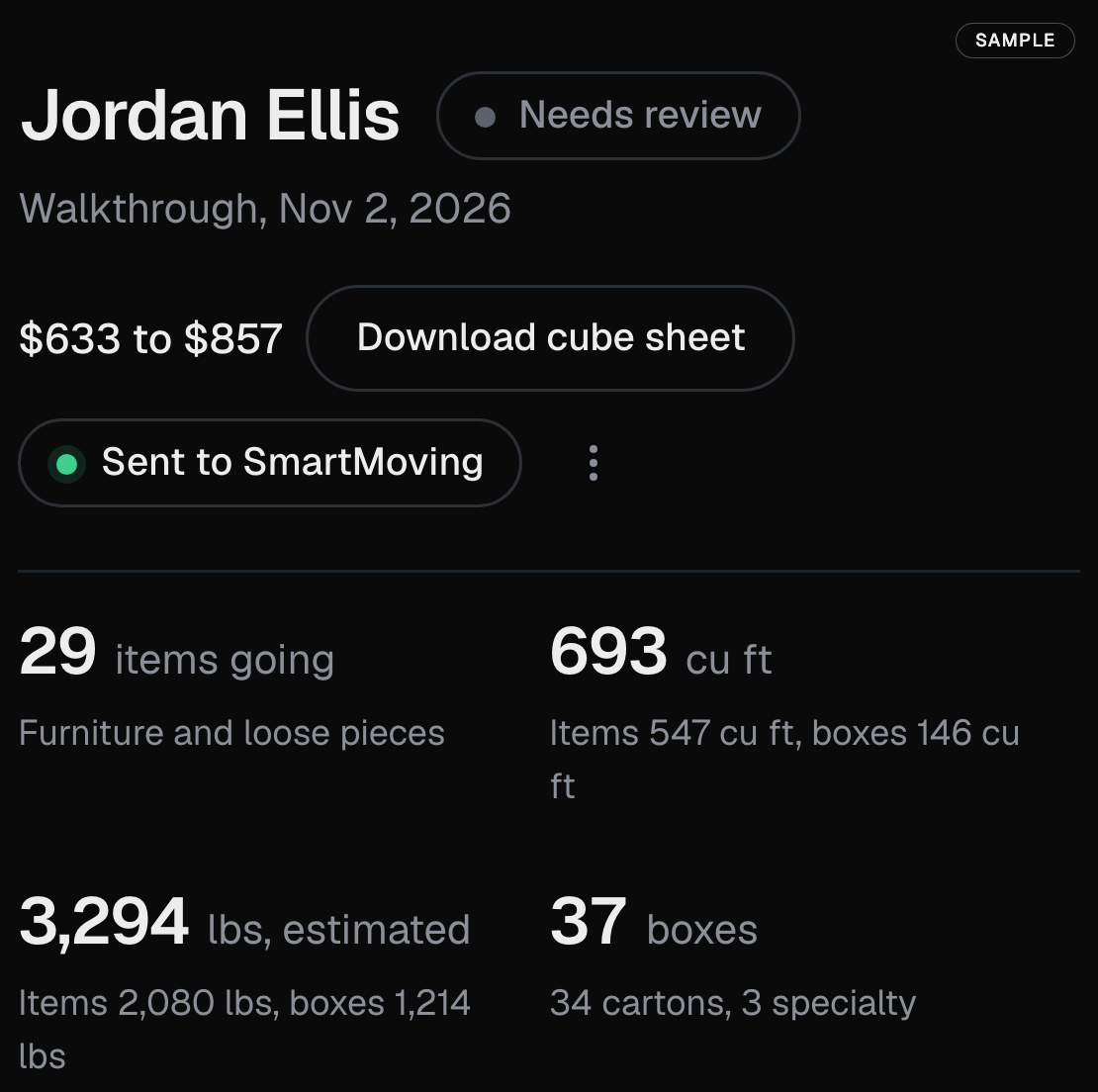
Each part has its own page. What the free plan includes is in the free Smart Quote Form for moving companies. What the customer sees, and how fast, is in the instant moving quote. How the range is worked out from your rates is in a moving cost calculator for your website.
What to check before you buy moving quote software.
- Whose prices the customer sees. Ask whether the number comes from your own rates or from a market average. A price from other companies on your website is a price you then have to explain.
- What the customer sees when they finish. It is either a number or a line that says you will be in touch. Both are sold as quote request software, and only the first one quotes.
- A range or one exact price. One exact price from a short form is a number you may have to walk back. A range leaves the final number to you. Ask which one the tool shows and who can change it.
- Where the quote the customer signs is written. If it is written in a second system, somebody retypes the job into your CRM. Ask what lands in your CRM without anyone typing: the lead, the price the customer saw, the inventory.
- When the deposit is taken. It can be taken on your website when the customer books, or after your office sends the estimate. Ask which, and whose account the money goes to.
- How it bills, and for how long. Ask whether the price is flat by the month, by the user or by the survey, and how long the contract runs. A price that is not on the vendor's site is a question for the demo.
Common questions
What is moving quote software?
Moving quote software is the software that gives a moving customer the quote. It comes in three kinds: the quote builder inside a CRM, which sends a quote after your office prices the move; a quote form on your own website that shows the customer a price on the spot; and a video walkthrough of the home that ends in a number built from what is really moving.
Is moving quotation software the same thing?
Yes. Quotation software, quote software and quoting software are three names for the same thing. Vendors and movers use all three, so compare what the product does for your customer, whichever word the vendor uses.
What is the difference between quote software and estimating software for movers?
Quote software is the customer's side: what number the customer sees, when they see it, and how it reaches them. Estimating software is your estimator's side: it builds the number from an inventory, cube and weight, and your rates. A CRM can carry both, and a tool sold by itself may cover only one side.
What is moving company quote request software?
It is the form on your website that takes a quote request. Some forms only capture the request and send it to your office, so the customer sees no number until somebody calls. Others price the answers from your rates and show the customer a price before they leave the site. Ask the vendor which one you are buying.
I already run a CRM. Do I need separate quoting software?
Maybe not. Your CRM already builds and sends the quote your office prices. What to check is whether it also shows a price on your website. When we read nine CRM vendor sites on 2026-11-12, a few said yes. For most of the others, the pages either described a website form that sends the lead in or did not say. If yours does not show a price, a quote form that sends its leads into that CRM fills the gap.
Can moving quote software show the customer one exact price?
Some vendors say theirs can, so ask on the demo. The Smart Quote Form from MoveBlueprint shows a range. It is an estimate from a short form, and you give the final number after you see what is moving.
What does moving quote software cost?
It depends on the kind. A quote builder comes with the CRM plan, and some CRM vendors publish that price and some do not. The Smart Quote Form from MoveBlueprint is free, with no card and no time limit. Booking with a card hold and the video walkthrough are $199 a month with one login, $79 a month per extra login and no contract.
Is MoveBlueprint moving quote software?
For two of the three kinds. The Smart Quote Form on your website shows each customer a price range from your own rates, and the video walkthrough ends in an inventory and a price range. MoveBlueprint is not a CRM. The quote your customer signs is written in the CRM you already run, and the lead and the inventory land there.
Keep exploring
- Free Smart Quote Form for moving companies →
- Instant moving quote on your website →
- Automated online booking with a deposit hold →
- Live video survey into your CRM →
- Best virtual and video survey software (2026) →
- What AI moving survey software costs →
- What a cube sheet is and how far to trust it →
- Study: most cube sheets are one document →
- Moving cubic feet chart by item →
- How the AI video survey works →
- Moving estimate types and the federal rules →
- Moving estimate accuracy →
- AI for movers: what it does well and where it falls short →
- AI software for moving companies →
- SmartMoving integration →
- CRM integrations →
- Deposit collection software →
- Best CRM for moving companies (2026 comparison) →
- Best moving company software (2026 comparison) →
- Moving estimate software →
- SEO for moving companies →
- Moving company website guide →
- SmartMoving alternatives →
- Yembo alternatives →
- MoveItPro alternatives →
- Supermove alternatives →
- Movegistics alternatives →
- Qubesheets alternatives →
- LiveSwitch alternatives →
- Vonigo alternatives →
- Elromco alternatives →
- Moverbase alternatives →
- Network Leads alternatives →
- HomeSurvey.ai alternatives →
- How to film a moving walkthrough →
- Recorded or live video walkthrough →
- What to ask on a moving quote form →
- Win a moving lead sold to other movers →
See it on your own site before you decide.
Book a demo and see the Smart Quote Form on your own website, or get the free form and add it yourself. If you are choosing a CRM at the same time, start with the best CRM for moving companies.