Walk the home on a video call, and get the inventory in your CRM.
You walk the customer's home with them on a live video call instead of driving out. The AI watches and listens, builds the inventory, and it lands in your CRM with weight, cube and box counts.
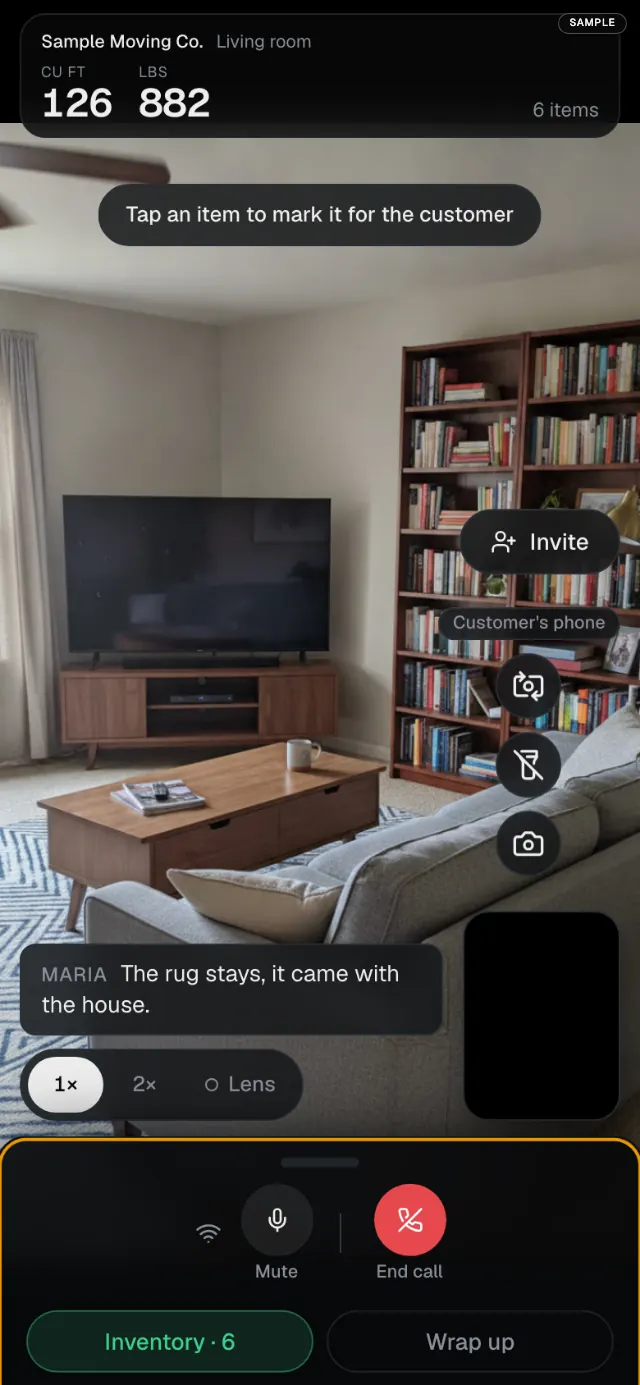
How a live walkthrough runs.
- 1
Send the customer a link.
They open it on their phone. No app to download, and you run the call from your browser.
- 2
Walk the home together.
They point the camera and talk you through each room. You ask what is going, what is staying and what needs special care.
- 3
The AI builds the inventory.
It recognizes the items it sees and uses what the customer says to sort what is moving. Cube and weight come from standard moving tables, never from measuring the picture.
- 4
It lands where you work.
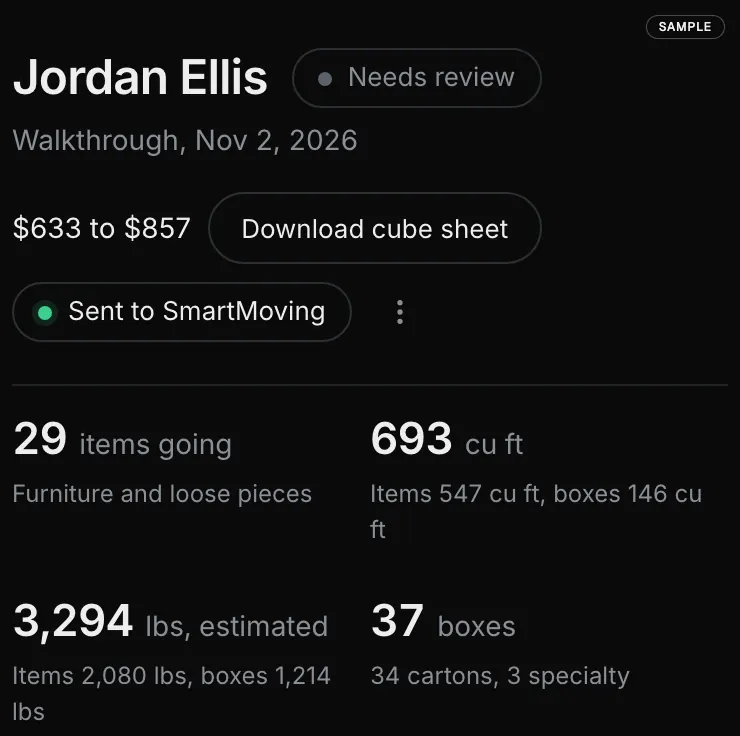
The item list, weight, cube and box counts go to your CRM or your MoveBlueprint dashboard, and you correct anything before you quote.
Watch it run, from the form to the live call.
What the video shows
Real MoveBlueprint screens on sample data and a pretend home, 42 seconds, no sound. The customer gets a price range on the quote form, from the mover's own rates. They can film the home once, talking as they go. The AI recognizes the items. Cube and weight come from standard moving tables. The inventory goes to the mover's CRM. Here, SmartMoving. Or walk the home together on a live video call, and the list builds as you go.
What to know before you quote on a video call.
- The drive is the cost you cut. An in-home estimate means a drive there and back. A live walkthrough takes the length of the call.
- The list writes itself. A video call that leaves you with only a recording means you build the inventory yourself afterwards. Here the AI builds it from the call.
- Your CRM stays your CRM. SmartMoving gets a native push. Any other CRM connects through the open Partner API or webhooks.
- Offer the recorded walkthrough too. Some customers would rather film on their own time. Both give you the same kind of inventory in the same place, unmetered on the $199 a month plan, behind the free quote form on your site.
Common questions
What is a live video survey?
You walk the customer's home with them on a video call instead of driving out. They point the phone camera and talk you through each room; you ask what is going and what is staying.
Does the customer need an app?
No. The customer opens a link on their phone and the call runs in the browser. You run it from your browser too.
What does the AI do on the call?
It watches the video and listens to what the customer says, recognizes the items, and builds the inventory. Cube and weight come from standard moving tables, never from measuring the picture. You can correct any item.
Where does the inventory go after the call?
Into your CRM or your MoveBlueprint dashboard: the item list, weight, cube and box counts. SmartMoving gets a native push; any other CRM connects through the open Partner API or webhooks.
Live call or recorded walkthrough?
Offer both. Some customers would rather film on their own time; some want a person on the line. Both end in the same kind of inventory in the same place.
Keep exploring
- Instant moving quote on your website →
- Online booking with a deposit hold →
- Best virtual and video survey software (2026) →
- What AI moving survey software costs →
- What a cube sheet is and how far to trust it →
- Study: most cube sheets are one document →
- Moving cubic feet chart by item →
- How the AI video survey works →
- Moving estimate types and FMCSA Item 411 →
- Moving estimate accuracy →
- AI for movers →
- SmartMoving integration →
- CRM integrations →
- Deposit collection software →
- Best moving CRM for small business →
- Best moving company software (2026 comparison) →
- Moving estimate software →
- SEO for moving companies →
- Moving company website guide →
- SmartMoving alternatives →
- Yembo alternatives →
- MoveItPro alternatives →
- Supermove alternatives →
- Movegistics alternatives →
- Qubesheets alternatives →
- LiveSwitch alternatives →
- Vonigo alternatives →
- Elromco alternatives →
- Moverbase alternatives →
- Network Leads alternatives →
- HomeSurvey.ai alternatives →
- ComeHome.ai alternatives →
- Virtual Moving Technologies alternatives →
- How to film a moving walkthrough →
- Recorded or live video walkthrough →
- What to ask on a moving quote form →
- Win a moving lead sold to other movers →
See a live walkthrough on a demo call.
When to use a live call and when to send a recorded walkthrough is in recorded or live video walkthrough, and how the AI video survey works is on the video survey page.