Online booking for movers, with the deposit held on the card.
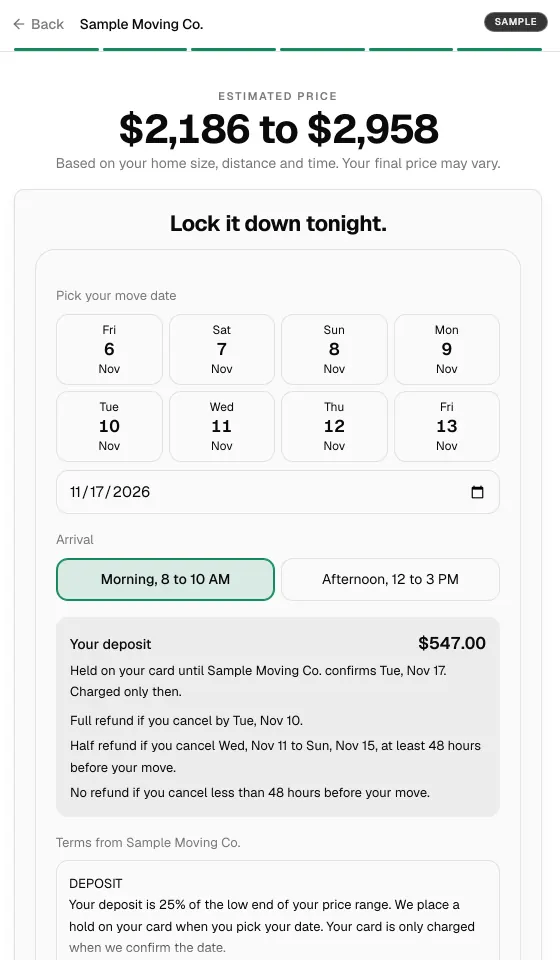
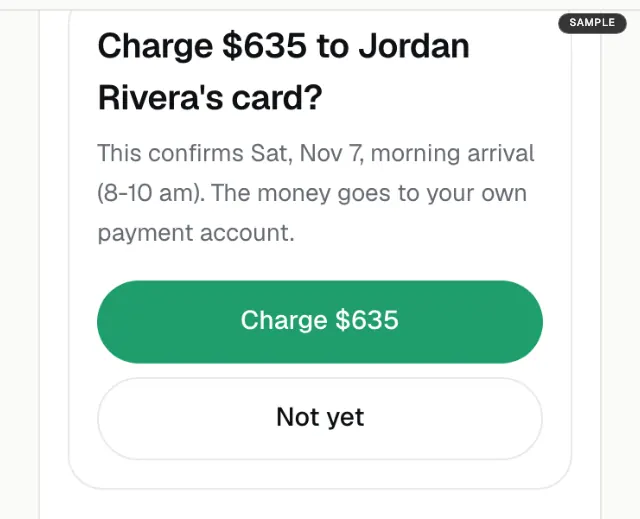
The customer sees a price range on your website, picks a date and puts a hold on their card for your deposit. You confirm in two taps, Confirm then Charge, and only then is the card charged, straight to your own account.
How a booking runs.
- 1
The customer sees a price range.
On the quote form on your website, from your own rates, or after a walkthrough of the home.
- 2
They pick a date and an arrival window.
They accept your booking terms on the same screen and see the exact deposit amount.
- 3
A hold goes on their card.
Nothing is charged yet. The date is requested, not booked.
- 4
You confirm in two taps.
The card is charged on your own Stripe or Square account. With SmartMoving connected, the job is created and confirmed there too.
- 5
Or you decline.
Decline, let the deadline pass, or the customer cancels first: the hold is cancelled and nothing is charged.
What to know before you take bookings online.
- You never lose control of the calendar. No job is booked until you confirm it, so a date you cannot cover never costs you a refund.
- The money is yours from the start. MoveBlueprint never receives or holds the deposit and takes no fee per booking. Booking is included in the $199 a month plan.
- The deposit is your rule. A flat amount or a percentage. Some states cap what a mover can take up front, so check yours before you set it.
- Some moves call you instead. Interstate and international moves, moves from California, and moves whose destination cannot be placed do not book online. Those customers are asked to call or request a callback.
Common questions
How does online booking work for a moving company?
The customer sees a price range on your website, picks a move date and arrival window, accepts your booking terms, and puts a hold on their card for your deposit. You get told and confirm or decline. Only when you confirm is the card charged, on your own account.
What if I cannot take the job?
Decline it, or let the deadline pass. The hold is cancelled and nothing is charged. If the customer cancels before you confirm, the hold is cancelled too.
Who holds the deposit money?
You do. The deposit is charged on your own Stripe or Square account. MoveBlueprint never receives or holds the money and takes no fee per booking. Booking is included in the $199 a month plan.
How much is the deposit?
Your call. Set it as a flat amount or a percentage, and the booking screen shows the customer the exact amount before the hold goes on.
Which moves can book online?
Local and in-state moves. Online booking is not offered for an interstate or international move, a move from California, or a move whose destination cannot be placed, and you can hold back other moves in your settings. Those customers are asked to call or request a callback.
Does the booking show up in my CRM?
When you turn on booking with a connected CRM, confirming a booking creates and confirms the job there. SmartMoving is connected today; a mover with no CRM sees the booking in the MoveBlueprint dashboard.
Keep exploring
- Instant moving quote on your website →
- Live video survey into your CRM →
- Best virtual and video survey software (2026) →
- What AI moving survey software costs →
- What a cube sheet is and how far to trust it →
- Study: most cube sheets are one document →
- Moving cubic feet chart by item →
- How the AI video survey works →
- Moving estimate types and FMCSA Item 411 →
- Moving estimate accuracy →
- AI for movers →
- SmartMoving integration →
- CRM integrations →
- Deposit collection software →
- Best moving CRM for small business →
- Best moving company software (2026 comparison) →
- Moving estimate software →
- SEO for moving companies →
- Moving company website guide →
- SmartMoving alternatives →
- Yembo alternatives →
- MoveItPro alternatives →
- Supermove alternatives →
- Movegistics alternatives →
- Qubesheets alternatives →
- LiveSwitch alternatives →
- Vonigo alternatives →
- Elromco alternatives →
- Moverbase alternatives →
- Network Leads alternatives →
- HomeSurvey.ai alternatives →
- ComeHome.ai alternatives →
- Virtual Moving Technologies alternatives →
- How to film a moving walkthrough →
- Recorded or live video walkthrough →
- What to ask on a moving quote form →
- Win a moving lead sold to other movers →
Take the deposit while the customer is still on your site.
See a booking run end to end in a demo. Deposit amounts and state caps are covered in moving deposits: a short guide for movers.