AI software for moving companies: what it does, step by step.
MoveBlueprint is AI software for movers who get leads from their own website. The customer sees a price range from your rates on the spot. They film the home on their phone, or walk it with you on a live video call, and the AI turns the video into an inventory with cube, weight and box counts. The lead and the inventory go into your CRM, and the customer can book a date with a card hold for your deposit. This page shows each step, the screens it runs on, and where the AI stops.

What the software does, from the first click to the job in your CRM.
- 1
The customer sees a price range on your website.
The Smart Quote Form asks where the move starts and ends, how big the home is, how much of it is moving, and about special items and packing. The range comes from the rates, travel, truck, access and item fees you set. This part is your rates at work, not AI, and the customer sees it before anyone in your office has read the lead.
- 2
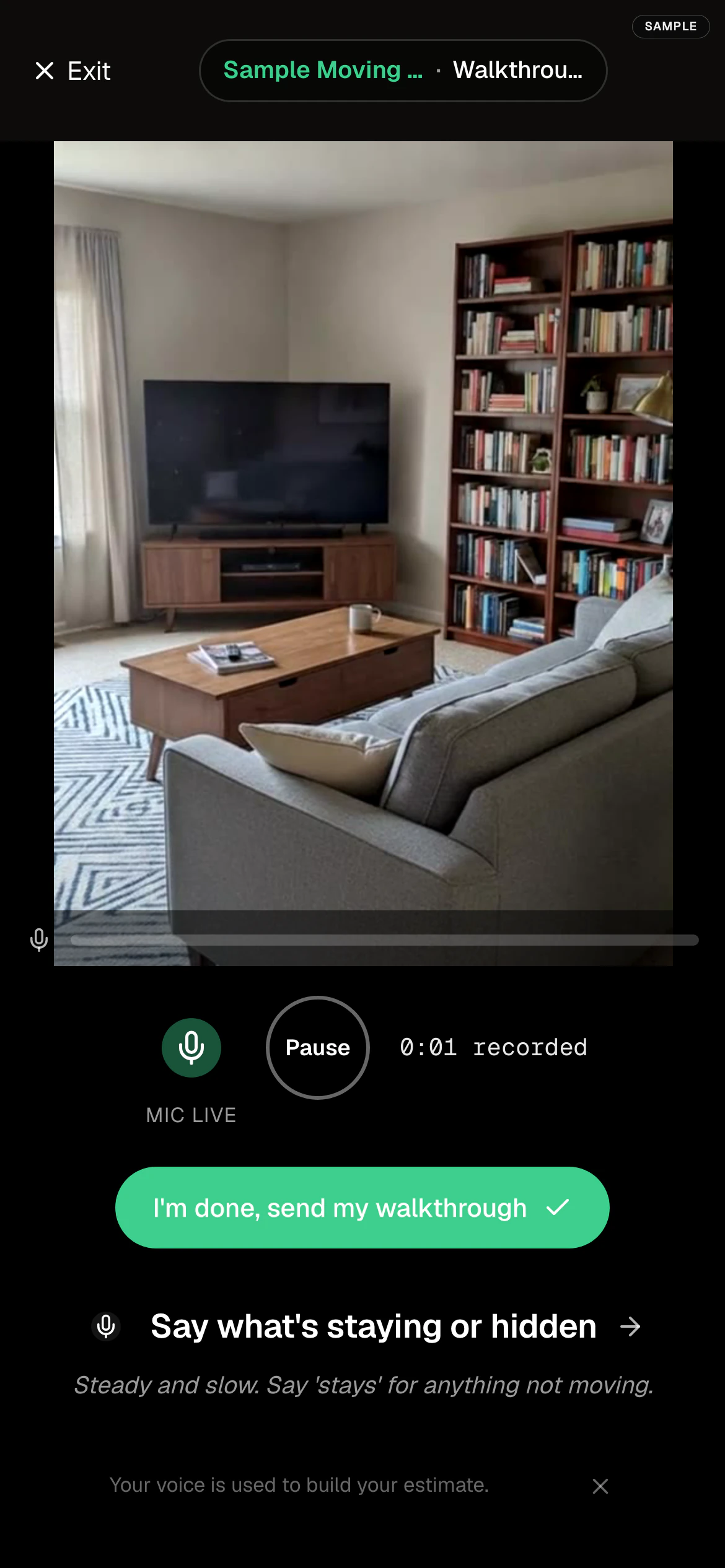
The customer films the home once, talking as they go.
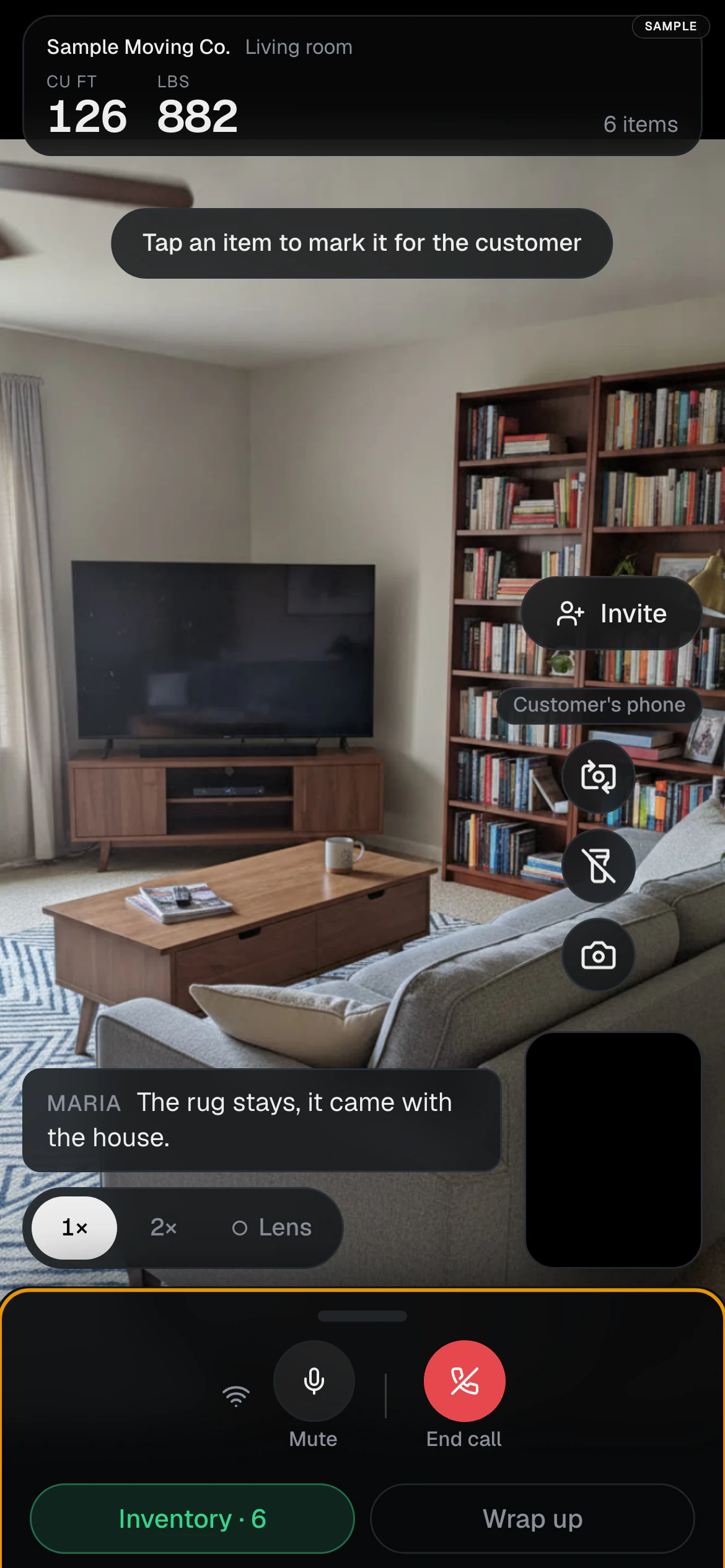
They film on their own phone with no app to download, and the link to film can go out on its own after the form. They say what is going and what is staying as they walk. Some customers would rather do it with you: you send a link and walk the home together on a live video call from your browser.
- 3
The AI recognizes the items it sees and hears.
It names each item room by room, a sleeper sofa, a curio cabinet, a stack of book boxes. When the customer says a piece is staying, that item is marked as staying. On a live call the list builds while you walk, so you see it grow on your screen during the call.
- 4
Cube and weight come from standard moving tables.
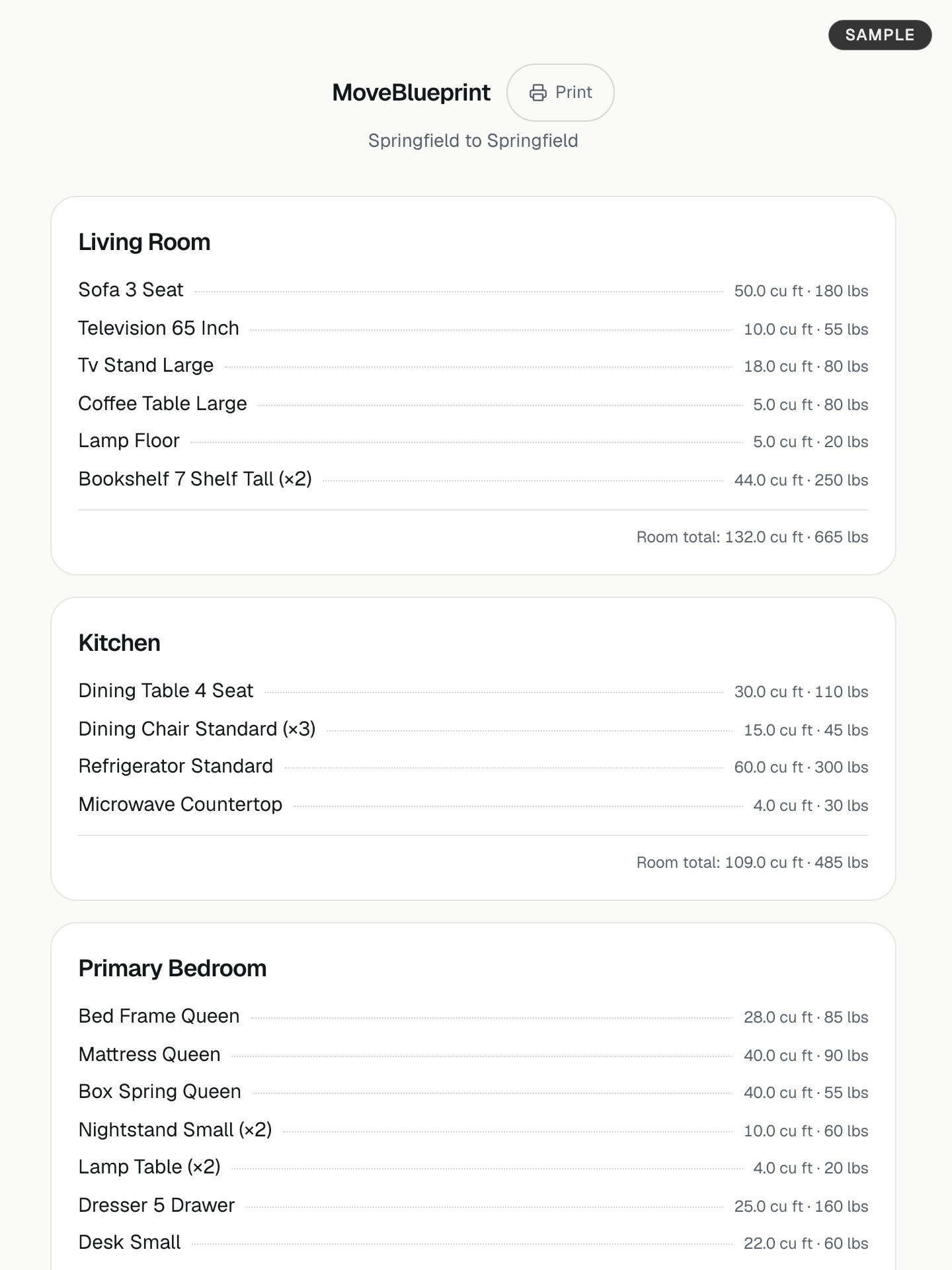
The AI does not measure anything from the picture. Each item it recognizes gets its cubic feet and weight from standard moving tables, and an item the table does not have gets a placeholder size until you correct it. A check flags lines that look physically off. You get the inventory, the box counts and a cube sheet, and the walkthrough ends in a price range from your rates.
- 5
The lead and the inventory go into your CRM.
The lead and the inventory go into the CRM you run. SmartMoving and Supermove take both on their own today, and MoversTech and Moverbase take each Smart Quote Form lead. For any other CRM, we build the connection for you when you sign up, at no charge. With no CRM, you work from the MoveBlueprint dashboard.
- 6
The customer books, and you confirm in two taps.
From the same screen as the price range, the customer picks a date and a hold goes on their card for your deposit. You tap Confirm, then Charge, and the money goes straight to your own account. A decline or no answer releases the hold. For a SmartMoving mover, the confirm also creates and confirms the job in SmartMoving.
Watch it run, from the form to the inventory in the CRM.
What the video shows
Real MoveBlueprint screens on sample data and a pretend home, 42 seconds, no sound. The customer gets a price range on the Smart Quote Form, from the mover's own rates. They can film the home once, talking as they go. The AI recognizes the items. Cube and weight come from standard moving tables. The inventory goes to the mover's CRM. Here, SmartMoving. Or walk the home together on a live video call, and the list builds as you go.
What the AI hands you from one walkthrough.
The point of a walkthrough is the list you would have written on an in-home visit, without the drive. This is what it leaves on the lead, from the customer's own video or from your live call.
| What you get | Where it comes from |
|---|---|
| Every item, room by room | The AI recognizes each item in the video and hears what the customer says about it |
| Items marked as staying | What the customer says out loud as they film or walk with you |
| Cubic feet and weight for each item, and a total for each room | Standard moving tables, never a measurement from the picture |
| Box counts | An estimate of the boxes each room will need, from the rooms and what is in them |
| A cube sheet you can download | The same inventory, laid out room by room |
| A price range | Your own rates applied to the inventory. An estimate: the final number is yours |
| The walkthrough itself | A link to the video on the lead, so you can watch any room again |
How the customer's side of the walkthrough runs is in how the AI video survey works, and the live call is in the live video survey.
The kinds of AI moving software, and where each one stops.
“AI moving software” covers five different kinds of product. They differ less in the AI than in where the customer starts and where the inventory ends up, so that is the way to tell them apart.
| Kind | What the AI does | Where the result goes |
|---|---|---|
| AI survey tools sold on their own (Yembo, HomeSurvey.ai) | Turns a walkthrough video into an inventory | A report, or the software the tool connects to |
| Video survey tools with AI reports (LiveSwitch) | Live video calls and recorded video requests, by web form or QR code. Its Sparky AI makes an inventory report from photos or video. | Its own reports. SmartMoving's site says LiveSwitch recordings and an AI inventory are saved to the SmartMoving job. |
| AI inventory sold to movers and to other software (Qubesheets) | An AI survey sold on its own and into existing moving software through an API | Its own report, or the software that buys it |
| CRMs with AI built in (MoveitPro+, Elromco) | A booking or quote form and an AI inventory inside the CRM | That CRM only, so you move your office into it |
| A quote form plus an AI walkthrough that feeds your CRM (MoveBlueprint) | A price range on your website, then a filmed or live walkthrough turned into an inventory | The CRM you already run |
Read from each vendor’s own site between September 23 and November 21, 2026. Products change, so check before you buy.
Yembo describes its survey starting from a link or a call your office sets up. MoveitPro+ puts a booking form on your site where the customer films the home and the AI builds the inventory; Elromco’s quote form prices the lead, with an AI inventory from photos.
Two questions sort them. Do you want to keep your CRM? Then a CRM with AI built in means moving your office, and the others feed what you have. And does the customer start on your website, or does your office have to send something first? Only the form-first kinds show the lead a price on your site and let them film the home before anyone in your office acts. MoveBlueprint is not the only form-first product: MoveitPro+ and Elromco both have their own, inside their CRMs. Prices for the survey tools are in AI survey software pricing.
What lands in each CRM.
MoveBlueprint is not a CRM, and it does not ask you to change the one you run. The lead and the inventory go into any CRM. Where we do not connect to yours yet, we build the connection for you when you sign up, at no charge. This is what goes in on its own today.
| CRM | What goes in | How |
|---|---|---|
| SmartMoving | The lead and the walkthrough inventory (the inventory uses your SmartMoving Open API key). On a booking, the confirmed job. | Native connection |
| Supermove | The lead, with the price range and the walkthrough link in the office notes, and the inventory as a survey on the same project | Native connection |
| MoversTech | Each Smart Quote Form lead, with the price range in the notes. The inventory: we build that connection when you sign up, at no charge. | Native connection for the lead |
| Moverbase | Each Smart Quote Form lead. The inventory: we build that connection when you sign up, at no charge. | Native connection for the lead |
| Any other CRM | The lead and the inventory | We build the connection when you sign up, at no charge |
| No CRM yet | Everything waits in the MoveBlueprint dashboard | Nothing to connect |
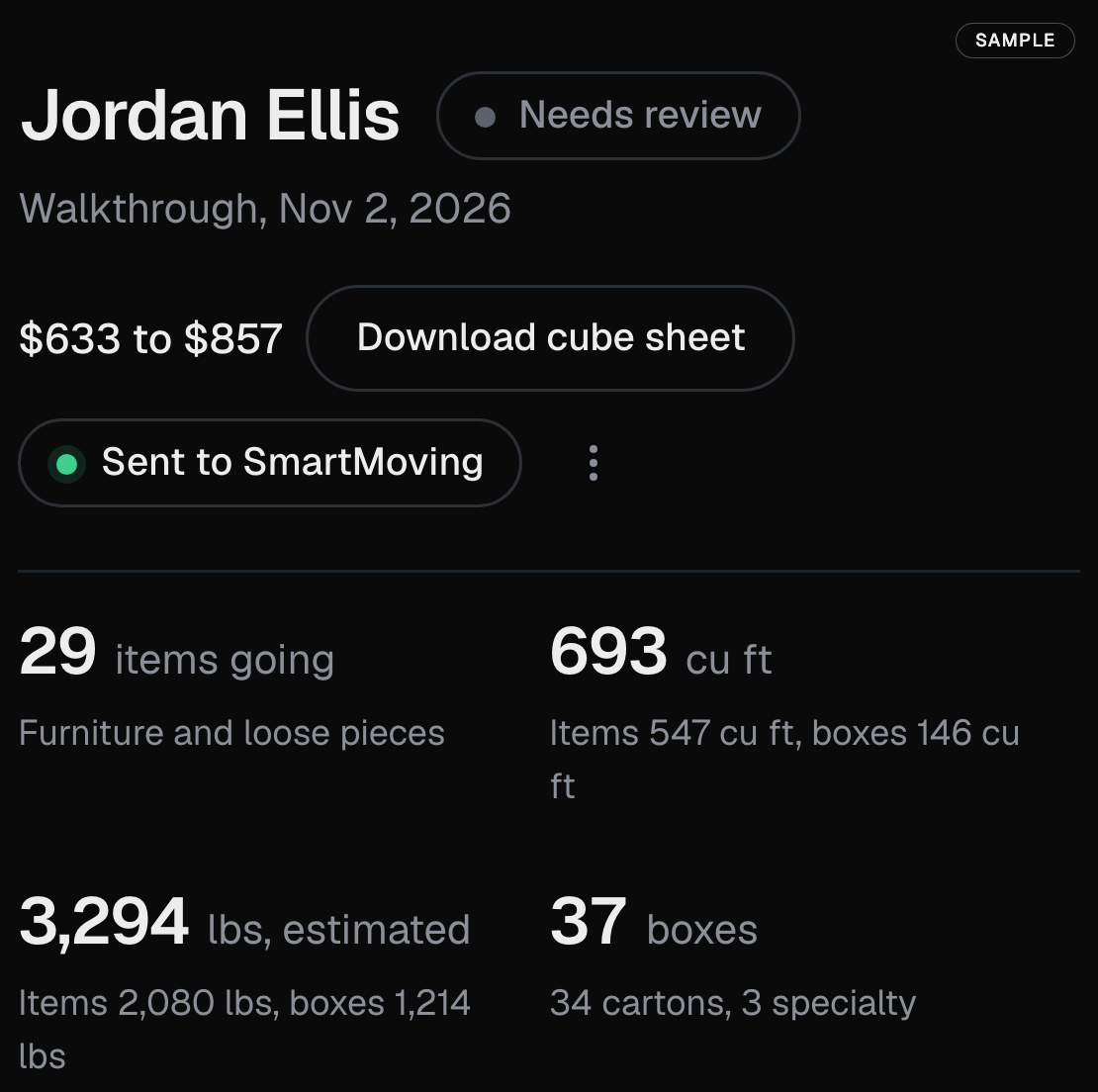
Each connection is described on CRM integrations. If you are searching for an AI CRM because you are choosing a CRM at the same time, the CRMs themselves are compared in the best CRM for moving companies.
What it automates, and what stays with your CRM and your office.
Moving company automation software covers a lot of ground. This is the part MoveBlueprint does, and the part it leaves to the tools you already have.
| MoveBlueprint does it | Your CRM or your office does it |
|---|---|
| A price range for each customer on your website, from your rates | The quote the customer signs |
| The link to film, sent after the form | Your follow-up emails and campaigns |
| The inventory, cube, weight and box counts from the walkthrough | Checking the inventory and setting the final number |
| A text to the owner for each new lead | Calling the customer back |
| Booking a date with a card hold for your deposit | Dispatch, crews, the schedule and billing |
Software that runs the whole office, from the schedule to the invoice, is compared in the best moving company software.
How it helps the sale.
A moving lead often goes to the company that gets a believable number to the customer first. The AI helps with the believable part, and the form and booking help with the first part.
The customer has a price range from your rates before they close the tab, and can hold a date with a card hold for your deposit. You get a text for each lead. When the customer films, the inventory is on the lead before your first call, so you can call back the same day with a number built from what is really in the home, without driving out to see it.
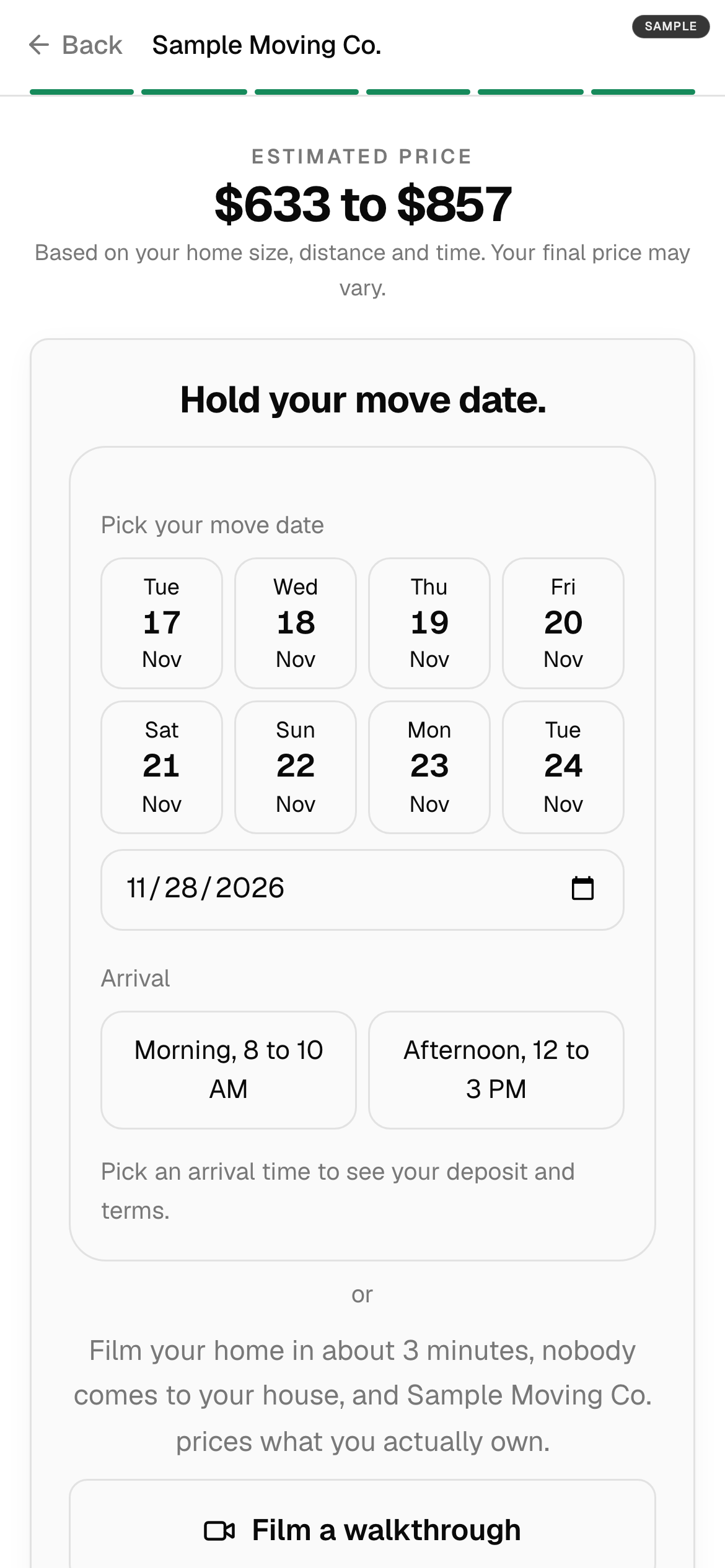
The booking side, with the deposit and the two taps, is in automated online booking for moving companies.
Where the AI stops.
- It recognizes items. It does not measure them. Cube and weight come from tables, so a custom piece gets a standard size until you correct it.
- It lists what is on camera. A room the customer does not film is not on the list, so ask about it.
- Every price range is an estimate. You review the inventory and set the final number.
- It does not run your office. Dispatch, crews and billing stay in your CRM, and MoveBlueprint does not perform or arrange moves.
- MoveBlueprint never holds the money. The deposit goes straight to your own account.
What AI does well in a moving company in general, where it falls short, and the questions to ask any vendor are in AI for movers. Tools that build the estimate, and what each one costs, are in AI moving estimate software.
What to know before you start.
- The Smart Quote Form is free. For good, with no card: the form with your logo, the price range from your rates, every lead to your email and your CRM, the owner text and the dashboard.
- The AI walkthrough and booking are $199 a month. One login included, $79 a month for each extra login. Walkthroughs are unmetered, booking has no per-booking fee, and there is no contract.
- Your rates set every price. You enter your rates, travel, trucks, access fees, special items and packing once. The form and the walkthrough both price from them.
- The customer needs no app. The form runs on your website, and the walkthrough and the live call run in the phone browser.
Common questions
What is AI software for moving companies?
Software that uses AI for one of the jobs in a moving company. The job it does best today is the inventory: the customer films the home or walks it with you on a video call, the AI recognizes the items, and cube and weight come from standard moving tables. Smaller uses are drafting replies and sorting leads. Much of what is sold as automation is plain rules, such as a price worked out from your rates, and that is fine as long as the vendor says which part is which.
What kinds of AI moving software are there?
Five kinds. AI survey tools sold on their own, such as Yembo and HomeSurvey.ai, turn a walkthrough video into an inventory. Video survey tools such as LiveSwitch run live video calls and recorded video requests, and LiveSwitch's Sparky AI makes an inventory report from photos or video. Qubesheets sells its AI survey to movers and also into other moving software through an API. CRMs with AI built in, such as MoveitPro+ and Elromco, put a quote or booking form and an AI inventory inside their own CRM, so you move your office into it. MoveBlueprint is a Smart Quote Form plus an AI walkthrough that feeds the CRM you already run. Read from each vendor's own site between September 23 and November 21, 2026.
Is MoveBlueprint an AI CRM for moving companies?
No. MoveBlueprint is not a CRM. It is the Smart Quote Form on your website, booking with a card hold for your deposit, and the AI video walkthrough. The lead and the inventory go into the CRM you run. SmartMoving and Supermove take both on their own today, and MoversTech and Moverbase take each Smart Quote Form lead. For any other CRM, we build the connection when you sign up, at no charge. Dispatch, crews and billing stay in your CRM.
Does the AI measure the furniture?
No. The AI recognizes what an item is, from what it sees and what the customer says. The cubic feet and weight come from standard moving tables, and an item the table does not have gets a placeholder size until you correct it. A check flags lines that look physically off, so you can look at them before you quote.
Does the AI set the final price?
No. The customer sees a price range worked out from your own rates, on the Smart Quote Form and again after a walkthrough. Every range is an estimate. You review the inventory and set the final number.
How does AI help a moving company make more sales?
By cutting the wait between the lead and a real number. The customer sees a price range on your site at once and can book a date with a card hold for your deposit. When they film the home, you get the inventory without a drive, so you can call back the same day with a number built from what is really in the home.
How much does MoveBlueprint cost?
The Smart Quote Form is free, for good, with no card: the form with your logo, the price range from your rates, leads to your email and your CRM, a text to the owner for each lead, and the dashboard. Booking with the card hold and the AI video walkthrough are $199 a month with one login included and $79 a month for each extra login. Walkthroughs are unmetered, booking has no per-booking fee, and there is no contract.
Keep exploring
- Free Smart Quote Form for moving companies →
- Instant moving quote on your website →
- Automated online booking with a deposit hold →
- Live video survey into your CRM →
- Best virtual and video survey software (2026) →
- What AI moving survey software costs →
- What a cube sheet is and how far to trust it →
- Study: most cube sheets are one document →
- Moving cubic feet chart by item →
- How the AI video survey works →
- Moving estimate types and the federal rules →
- Moving estimate accuracy →
- AI for movers: what it does well and where it falls short →
- SmartMoving integration →
- CRM integrations →
- Deposit collection software →
- Best CRM for moving companies (2026 comparison) →
- Best moving company software (2026 comparison) →
- Moving quote software: the three kinds →
- Moving estimate software →
- SEO for moving companies →
- Moving company website guide →
- SmartMoving alternatives →
- Yembo alternatives →
- MoveItPro alternatives →
- Supermove alternatives →
- Movegistics alternatives →
- Qubesheets alternatives →
- LiveSwitch alternatives →
- Vonigo alternatives →
- Elromco alternatives →
- Moverbase alternatives →
- Network Leads alternatives →
- HomeSurvey.ai alternatives →
- How to film a moving walkthrough →
- Recorded or live video walkthrough →
- What to ask on a moving quote form →
- Win a moving lead sold to other movers →
Judge the AI on a real walkthrough.
Book a demo and watch a walkthrough turn into an inventory with cube, weight and box counts, then into the job in your CRM. Or get the free Smart Quote Form and put it on your site yourself.