The Complete Guide to Moving Company Software in 2026
There are sixteen moving-industry CRM tools, three AI quote platforms, six dispatch apps, and a long tail of niche software. This guide tells you what each one actually does, what they actually cost, and which combination you actually need based on the size and shape of your operation. Written by Daniel Kline, 2nd-generation Florida mover. I've personally worked on hundreds of moves and talked to hundreds of company owners building this.

TL;DR
- Moving company software splits into 4 overlapping categories: AI quoting, CRM / sales pipeline, dispatch / operations, and accounting / payments. Most movers use 2-3, not all 4. Buying a "bundle" that covers everything wastes money if you only use a third of it.
- Pricing in the moving industry is regulated math, not a guess. FMCSA Item 411 requires tariff-cited line items for interstate estimates. DOE-indexed fuel auto-pull is rare; most CRMs make you enter it manually each month.
- Skip the 60-90 minute sales demo. A 15-minute self-evaluation (pricing page → contract length → recent Capterra reviews → integrations → customer-facing demo → price-increase reviews) filters 90% of bad fits before you ever talk to sales.
- MoveBlueprint isn't a CRM. It's the quote form and the AI video survey that feed a real inventory into whichever CRM you pick. $199 a month, surveys unmetered, no contract. SmartMoving stays the durable bet for large enterprise operators that specifically need its mature crew mobile app.
- Annual contracts trap you. Start monthly, pay the 10-20% premium for optionality, switch to annual only after 6 months of confirmed fit.
- Treat AI quoting like a junior estimator, not a magic box. Modern AI catches most of your inventory in well-lit videos. Software that uses a verified cube sheet for canonical weights (not AI-hallucinated guesses) and a plausibility critic on per-room totals will get closer to accurate every time.
Who this guide is for
- Owner-operators still doing the estimating themselves, trying to figure out what to buy first.
- Established movers with office staff re-evaluating their CRM after a price hike or contract renewal.
- New movers about to launch and trying to avoid the big software bundle the salespeople keep pitching.
What you'll learn
- The four categories of moving software and what problem each solves.
- How moving company pricing actually works (cube sheets, tariff math, DOE fuel, FMCSA Item 411).
- How to evaluate a moving CRM in 15 minutes (vs being trapped in a 90-minute demo).
- The real pricing of every major vendor in the space (with citations).
- Which combination of tools works for which operation size.
- The pitfalls every mover makes when first buying software.
Part 1: The four categories of moving company software
Quick story and context for my background before we get into it: I am a second-generation Florida mover. I grew up around moving crews and worked with different long-haul drivers, so I saw the shift to electronic inventories and pre-move AI video surveys firsthand. There is one universal complaint: lead-closing time and inventory accuracy. I have watched owner-operators legitimately struggle with electronic inventory; the issue is not the software itself, it is the accuracy of the off-site walkthrough. That is exactly what MoveBlueprint is built to fix.
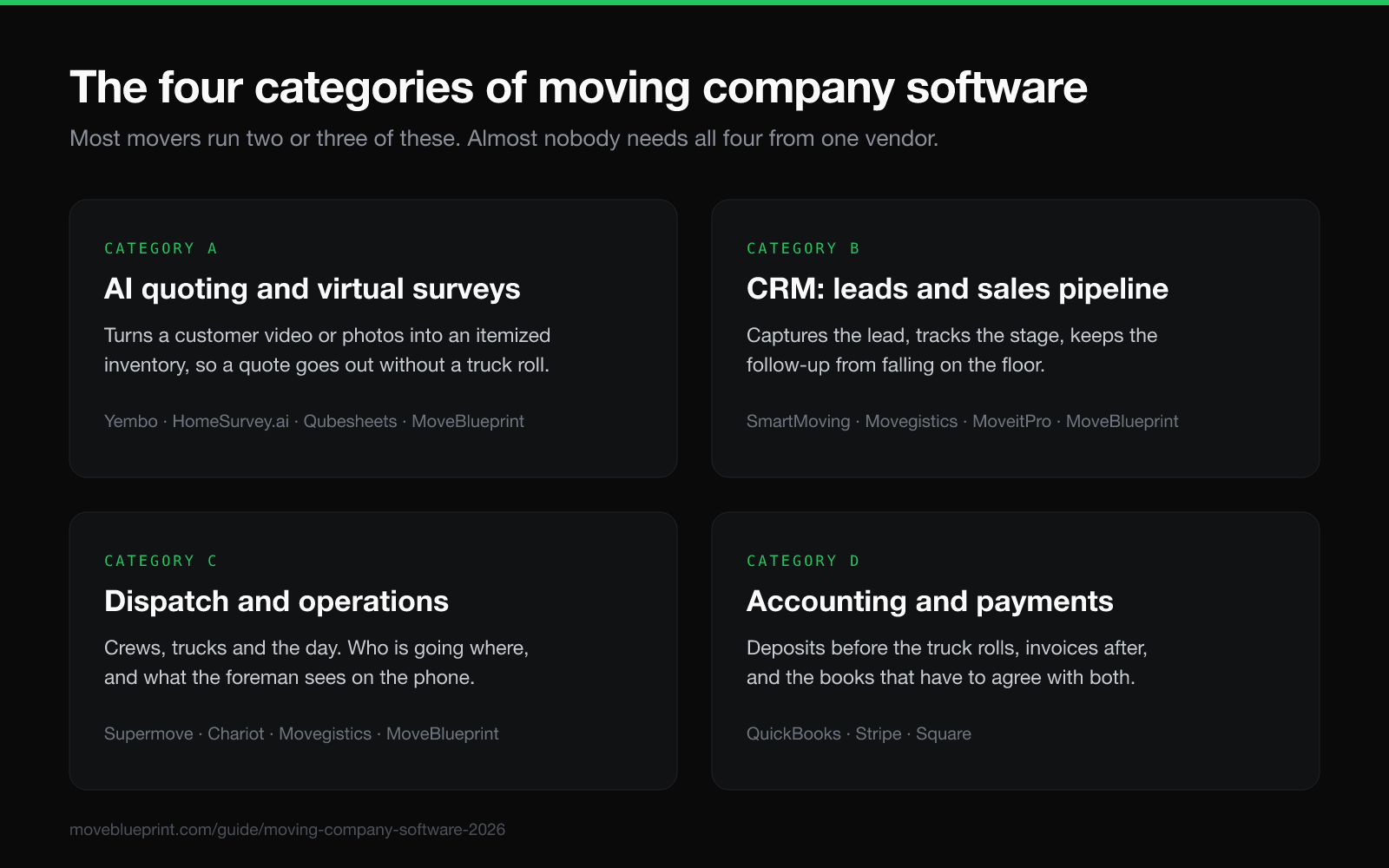
Most movers buy "CRM software" and assume it does everything. It doesn't. Whether a vendor calls it a moving CRM or moving business software, the category is actually four overlapping product lines, and most vendors are strong in one or two of them.
Category A: AI quoting / virtual surveys
The tools owners usually search for as moving quote software or moving estimate software. Software that turns a customer's video walkthrough (or photos) into an identified inventory list. A separate pricing engine (not the AI) derives volume and weight from industry-standard cube sheets. Examples: Yembo, Qubesheets, HomeSurvey.ai, LiveSwitch, MoveBlueprint.
What problem it solves: Customer asks for a quote at 9pm. Estimator can't visit until Thursday. Quote gets emailed Friday. Customer signed with the company that quoted in 5 minutes. AI quoting collapses that timeline to instant.
What it doesn't do: Dispatch, crew scheduling, accounting, inventory of your own warehouse.
Category B: Moving CRM (lead capture + sales pipeline)
Software that captures inbound leads, scores them, tracks pipeline stages, and integrates with your phone/email/SMS. Examples: SmartMoving, Movegistics, MoveItPro, Vonigo.
What problem it solves: Lead from your website goes to the wrong inbox and ages for 4 hours; lead from your Google Ad gets called twice by two different reps; no way to know which marketing channel actually produced revenue.
What it doesn't do: Real-time crew dispatch, accounting, inventory of your own warehouse.
Category C: Dispatch / operations
Software that schedules crews, optimizes routes, tracks truck location in real time, syncs with the foreman's tablet. Examples: SmartMoving, Movegistics, MoveItPro, Supermove, Chariot CRM.
What problem it solves: Foreman doesn't know which job to go to; dispatcher has to call drivers all morning to confirm ETAs; truck #3 is 90 minutes late and nobody told the customer.
What it doesn't do: Quote leads, capture inbound traffic, customer e-signature flow.
Category D: Accounting + payments
Software that handles invoicing, deposits, final payments, and integrates with QuickBooks or Xero. Examples: SmartMoving (native + QuickBooks), Stripe (raw payments), Square.
What problem it solves: Manually invoicing customers from a Google Sheet, tracking unpaid balances in your head, scrambling at year-end to reconcile bank statements with bookings.
What it doesn't do: Lead capture, dispatch, AI quoting.
The honest truth: Modern movers use all four categories; they just don't want to pay for four separate tools or one enterprise bundle on an annual contract. MoveBlueprint only lives in Category A: the quote form on your website and the AI video survey behind it. It doesn't touch B, C or D, it feeds whichever tool you already use for those, $199 a month, surveys unmetered. SmartMoving and Movegistics bundle all four categories at higher prices with annual lock-in. Yembo covers Category A the same way MoveBlueprint does.
Part 2: How moving company pricing actually works
Most movers buy software without understanding what the software is even calculating. Pricing in this industry isn't a number: it's a chain of math defined by federal regulation, tariff publishers, and a 1970s cube-sheet tradition. If you don't know what's underneath the number, you'll either underbid (lose money) or overbid (lose leads).
The cube sheet
Every moving estimate in the United States traces back to a "cube sheet", a master list of standard household items with their average weight and cubic volume. The most-cited sources:
- California Public Utilities Commission Max Rate Tariff 4, the state-mandated reference movers use in CA.
- Atlas Van Lines 400-DOE Cube Sheet, the van-line standard, widely adopted.
- SmartMoving / UVL (Unigroup Van Lines) cube sheet, modern CRM-embedded version.
Movers' default rule: 7 pounds per cubic foot as the density factor. So a sofa rated at 50 cubic feet weighs about 350 lbs. A queen bed at 35 cubic feet weighs about 245 lbs. The math is decades old and physics-grounded.
Modern AI quoting tools (Yembo, MoveBlueprint) all reference cube-sheet derivatives. What separates them: how the AI assigns items to cube-sheet rows, and how trustworthy the math is once it does.
FMCSA Item 411: what's actually required by law
For interstate moves, the Federal Motor Carrier Safety Administration mandates a "Binding Estimate" if the mover and customer want one. §375.403 says the quote must include "quantities and services"; itemized inventory is required at pickup per §375.501, but at binding time a quantities-and-services summary is enough.
Item 411 also requires the estimate to disclose:
- Mover's USDOT and MC numbers.
- Whether the estimate is binding, non-binding, or guaranteed-price.
- The cost basis (linehaul rate per cwt, fuel surcharge percentage, additional services).
Software that's "FMCSA-compliant" out of the box tariff-cites every line item so you can show the customer Item 135 (linehaul), Item 16 (fuel), Item 60 (insurance), Item 105 (packing). Most CRMs leave the partner to manually configure tariff publishers and item codes. A few, like Movegistics' enterprise tier, pre-wire this.
DOE-indexed fuel surcharge (Item 16)
The Department of Energy publishes weekly No. 2 diesel ULSD pricing through the EIA Petroleum API. Moving Pros Network, Atlas, and other tariff publishers maintain a "fuel bracket schedule" that maps DOE diesel price → fuel surcharge percentage. As of mid-2026, with DOE diesel at $5.64/gal, MPN's top fuel bracket fires a 24% surcharge.
Why this matters: if your CRM doesn't auto-pull DOE diesel weekly, you're either guessing at the surcharge or under-charging. Yembo builds its estimate from your tariff, but its site doesn't say whether it pulls DOE diesel on its own. Most CRMs make you enter the fuel rate manually each month.
Packing labor + packing materials (Item 105)
Industry standard 2026: 3 hours for studio, 4 for 1BR, 5 for 2BR, 7 for 3BR, 9 for 4BR, 12 for 5BR (full pack). Multiply by hourly rate. Add packing materials at ~$10 per cwt of weight.
Most CRMs roll packing into a flat "packing fee" line item. Better software splits it: separate "packing labor" and "packing materials" lines with tariff codes. Customers trust transparent line items; opaque pack fees get pushed back on.
Real-world example: a local move I quoted recently
New Smyrna Beach 10x20 storage unit → single-family home in Daytona Beach. ~17 miles, ~7,500 lbs of contents (10x20 packed 70% full at ~7 lbs/cuft). This is a local move, billed hourly, not by cwt, so the math is different from the interstate example most movers think of:
| Line item | Amount |
|---|---|
| Load at storage (3-man crew, 4h × $170/hr) | $680 |
| Travel to destination (0.5h × $170/hr) | $85 |
| Unload at home + placement (4h × $170/hr) | $680 |
| Stairs fee (2nd-floor master, Item 141) | $75 |
| Truck + fuel flat | $150 |
| Total | ~$1,670 |
That's the math behind a typical local job. Interstate is different: linehaul × cwt + Item 16 fuel + Item 60 valuation, as shown above. Either way, if your CRM hands you a single number without showing the chain, you can't sanity-check it and you can't defend it to the customer.
Part 3: How to evaluate moving CRM software in 15 minutes
From conversations with owners shopping for a CRM, the bottleneck that surfaces most often isn't features: it's onboarding time. Most modern CRMs need an internal team to configure tariff, integrations, and import leads, and the round-trip is days or weeks. Whatever you pick, you shouldn't have to commit to an annual contract before you've felt the onboarding yourself. Adding the survey layer on top is faster: MoveBlueprint's quote form goes on your website with one embed snippet, and if you want help, we do it with you on a call.
Most vendors will try to lock you into a 60-90 minute demo where the salesperson controls the narrative. Skip it. Here's a 15-minute evaluation that filters 90% of bad fits before you ever talk to sales.
Step 1: Open their pricing page (2 min)
- Is pricing published? Or is it "schedule a demo to learn more"?
- Hidden pricing means enterprise sales process. For SMB movers, this is usually a red flag: it means you'll be on calls for 2 weeks negotiating contract terms.
- Note the cheapest tier and what's included. Often the cheapest tier lacks the one feature you actually need (SmartMoving, for example, gets a customer-filmed AI survey through a LiveSwitch, Yembo or ComeHome.ai integration, each a separate subscription).
Step 2: Find the "contract length" detail (2 min)
- Monthly vs annual matters. Annual locks you into 12 months of paying for a tool you might outgrow or hate.
- Trial period? With or without credit card?
Step 3: Check their Capterra / G2 reviews (3 min)
- Recent reviews matter more than old ones. Look at the last 6 months.
- Search reviews for "support", "billing", "cancel". Worst reviews are about these three.
- 4.0-4.5 with 200+ reviews is generally a healthy product. 4.9 with 12 reviews can be paid reviews.
Step 4: Check the integrations page (2 min)
- Do they integrate with the dispatch tool / accounting software / SMS provider you actually use?
- If the answer is "API access on the Enterprise tier", that's not an integration, that's "you'll build it yourself."
Step 5: Try the customer-facing demo if they have one (5 min)
- The best test: can YOU finish a self-serve customer quote in their tool? If their own demo is broken or requires a sales call, that's a tell.
- MoveBlueprint: live demo at
pro.moveblueprint.com/quote/moveblueprint-demo?demo=1. Yembo: schedule a call. SmartMoving: schedule a call. Movegistics: schedule a call.
Step 6: Read 3 user reviews that mention price increases (1 min)
- Many CRMs raise prices 10-15% per year. Read what existing customers say about renewals. If you see complaints about "raised prices 20% with 2 weeks notice", assume that will happen to you.
If a vendor fails steps 1, 2, or 5, you're either looking at an enterprise sales process not designed for SMB movers, OR a tool that's too sophisticated for your operation. Either way, move on.
Part 4: The major players in moving company software (2026)
What follows is an honest profile of the major CRM and AI-quoting tools in the space. Pricing is from each vendor's public page or recent Capterra moving software listings; capabilities are from product docs, partner conversations, and (where I've used them) firsthand experience.
Moving company software comparison table (2026)
| Vendor | Best for | Pricing | AI quoting | Dispatch | Trial | Contract |
|---|---|---|---|---|---|---|
| SmartMoving | Shops with office staff who want everything under one roof | Not published | ➕ Through LiveSwitch, Yembo or ComeHome.ai integrations | ✅ | Not published | Monthly, quarterly or annual, per their page |
| Movegistics | Established movers; mid-tier | Not published; AI survey packs and a full CRM tier | ✅ HomeSurvey.ai, sold in survey packs | ✅ | None published, stated on their page | Month to month, no contracts, per their page |
| MoveItPro | Larger enterprise operators; mature crew app | $359/mo on 12 months prepaid, $449 monthly | ✅ Live-call video survey on every plan; AI usage billed by tokens | ✅ | Not published | 12, 24 or 36-month agreement |
| Yembo | AI survey, tariff estimate and e-sign as a suite; you already have a CRM for ops | Not published | ✅ Specialist | ❌ | None, per their Capterra listing | Not published |
| Supermove | Mid-to-large companies | Not published, no pricing page | ✅ Across funnel | ✅ | Not published | Not published |
| Vonigo | Multi-vertical service businesses | Not published; per user | Not published | ✅ | Not published | Not published |
Prices, trial terms and contract terms above were read from each vendor's own pages on 2026-09-17. Where a vendor publishes no price, the table says so and stops; no listings-site ranges. Review scores used to sit in this table and have been removed: they move every week, and a number printed here in August is wrong by September. Check Capterra directly for current scores. MoveBlueprint isn't a row on this table. It's not a CRM, it's the AI video survey and the website quote form that feed a real inventory into whichever of these six you pick. More on that after the profiles below.
Below: full profile per vendor. Pricing read from vendor pages on 2026-09-17; Capterra counts move weekly, check Capterra's moving-software category for current ones.
SmartMoving
Best for: Established movers with office staff who need everything in one tool. Pricing: not published. Their pricing page names a Growth plan billed monthly, quarterly or annually, with a Pre-Move Survey App (a licensed tablet app for your own onsite estimator) as an optional add-on and no figure on either (read 2026-09-17). Strengths: Lead capture, estimates, dispatch, storage, accounting, payments and a mobile crew app under one roof. 4.9/5 Capterra with 143 reviews (re-read 2026-09-17), most-mature SMB-mover CRM on the market. Weaknesses: No published price; a customer-filmed AI survey comes through a LiveSwitch, Yembo or ComeHome.ai integration, each its own subscription; three-week onboarding by their own figure; sales-led demo process. Overkill for a company where the owner is still doing the estimating.
Movegistics
Best for: Established movers wanting mature workflow at a mid-tier price. Pricing: not published. Their pricing page sells AI survey packs (25 to 150 surveys a month) and a full CRM tier, each routed to Get Pricing; month to month, no contracts (read 2026-09-17). Strengths: Deep moving-industry-specific workflows, storage and tariff tooling. Strong dispatch + crew app. The HomeSurvey.ai survey is built by the same team and wired in. Weaknesses: No published price; the AI survey is metered in packs; reviewers' most consistent note is the learning curve.
MoveItPro
Best for: Larger enterprise operators that need a mature, field-tested crew mobile app on day one. Pricing: $359/month on a 12-month agreement prepaid, or $449 billed monthly, down to $292 at 36 months. Two office users included, extra office users $70 to $80/month, crew app $20 a user (read 2026-08-15). Strengths: Mature, field-tested mobile crew app: drivers actually love using it. Solid dispatch + scheduling. Every feature in every tier. Weaknesses: The video survey (MoveitPro+) is a live call, so someone from your office has to be on it, and its site does not say the call produces an inventory. AI usage bills by tokens on top of the plan.
Yembo
Best for: Movers who want the AI survey, a tariff-built estimate and the customer signature from one vendor, with a Managed Surveys mode where Yembo staff run the survey. Pricing: not published. The site runs Get Demo and Contact Us, and the Capterra listing reads Contact vendor with no trial period (read 2026-09-17). Strengths: Four survey modes (self-survey, live Smart Consult, onsite, Managed). Estimates built from your tariff with e-signature inside Yembo. Claims product. Their site cites millions of annotated videos and deployments in 40+ countries. Weaknesses: Sales-led; no price, contract length or CRM list published; not a CRM, so pipeline, dispatch and crews live elsewhere.
Supermove
Best for: Mid-to-large companies needing AI sales automation and advanced fleet coordination. Pricing: not published; no pricing page, every route ends at Book a Demo (read 2026-09-17). Strengths: Modern UI, AI features across the funnel: an AI call center, AI voice agents and an AI Sales Copilot that transcribes the rep's call and extracts the items mentioned. Weaknesses: No published price; a customer's Virtual Walkthrough video still needs an estimator to build the inventory by hand.
Vonigo
Best for: Service businesses with multiple verticals (moving + cleaning + landscaping + HVAC). Pricing: not published; per user, demo to get a number (read 2026-09-17). Strengths: Multi-vertical, flexible. Weaknesses: Not moving-industry-specific. Customizing it for moving workflows is partner-on-your-own work.
MoveBlueprint
Not a CRM, so it isn't really a seventh row on the table above, it plugs into all six. MoveBlueprint puts a quote form on your website and turns the customer's own walkthrough video into an inventory: item by item, with weight and box counts pulled from industry-standard tables, not guessed by the AI. The inventory pushes into whichever CRM you picked above, native for SmartMoving, through the Partner API and webhooks for the rest, so you quote from a real inventory the same day. Best for: whichever CRM you already run, or are about to pick from this list. Pricing: $199 a month, surveys unmetered, no contract. Strengths: identify-only AI (the model names items; canonical weight and cube come from a standard cube sheet, never an AI-hallucinated weight). A Claude plausibility critic flags items that look physically off. One continuous narrated walkthrough, no room picker. What the customer says helps sort what is moving from what is not. Goes on your site with one embed snippet, with setup help if you want it. Weaknesses: Newer (launched 2026). No CRM, dispatch, billing or e-sign of its own, it hands the inventory to whichever tool does that job for you.
Moverbase, Elromco, Network Leads, others
There's a long tail of niche or older tools. Most are either feature-light (Moverbase at $29/mo is bare-bones lead capture) or full platforms you'd move your whole operation onto (Elromco, from $289/mo, is a complete moving CRM with its own AI photo inventory). Skip unless you have a specific reason to evaluate them.
Part 5: Which moving software combination should you actually buy?
Most guides skip this. Here's the honest matrix: what I'd actually tell someone if they called me.
Just starting out (< 10 jobs/month)
Hold off on a CRM. At this volume, Google Calendar, Stripe and a Google Form technically work. The one thing worth adding early is a real inventory: MoveBlueprint's survey runs $199 a month and plugs into whatever CRM you build toward later, so you aren't starting over.
Independent mover (10-40 jobs/month)
Movegistics or SmartMoving cover pipeline, quoting and dispatch at this size. Add MoveBlueprint's survey on top so leads that film come with a real inventory: $199/mo, unmetered, feeding whichever one you picked.
Growing company (40-100 jobs/month)
Same CRM logic as above, just more leads through it. SmartMoving or Movegistics scale fine here. The survey layer stays at $199/mo regardless of volume, surveys unmetered.
Established operator (100-300 jobs/month)
SmartMoving or MoveItPro if a mature native crew mobile app is non-negotiable on day one; Movegistics if you want mature moving-industry workflow month to month. Only MoveItPro publishes a price ($359 a month on a 12-month prepaid agreement); the other two you get on a demo. Whichever you land on, MoveBlueprint's survey feeds straight into it for $199/mo on top.
Large enterprise (300+ jobs/month)
Yembo for the survey and estimate, plus SmartMoving / Movegistics / Supermove for ops. Yembo sells four survey modes, including Managed Surveys run by its own staff, and builds the estimate from your tariff with e-signature inside Yembo; at this volume you have estimators to put against it. Pair it with a full CRM for dispatch and crew. Yembo publishes no price, so get both quotes before you commit.
Part 6: Pitfalls every mover makes when first buying moving software
From conversations with movers going through this process, here are the failure modes:
Before the pitfalls, one thing I care about with modern CRMs: fast, direct support, from the person who actually builds the features and fixes the bugs. With MoveBlueprint, support goes straight to me, the founder; I read every email and ship fixes quickly. Most CRM support won't get back to your email for 2-3 business days.
Pitfall 1: Buying the everything-bundle first
Movers buy SmartMoving thinking they'll use everything. Three months later they've used the CRM and dispatch features but never touched the customer portal or the accounting integration. They're paying $400/mo for $150 of value.
Fix: Match tools to the bottleneck. If your bottleneck is quote turnaround, buy AI quoting first. If it's dispatch chaos, buy a dispatch tool first. Don't buy the bundle before you know which feature you actually need.
Pitfall 2: Signing the annual contract
The discount looks great until you realize the tool doesn't fit and you're locked in. Annual contracts force you to commit to 12 months of software you might outgrow in 3.
Fix: Start monthly. Pay the 10-20% premium for the optionality. Switch to annual after 6 months of confirmed fit.
Pitfall 3: Ignoring the integration map
Movers buy two tools that don't talk to each other. Now you're double-entering leads, manually copying inventory from one app to another, and the data drift kills your reporting.
Fix: Before buying tool #2, verify it pushes data to tool #1 (or vice versa). Native integrations beat zapier-style middleware.
Pitfall 4: Not configuring tariff publishers
The CRM is technically tariff-compliant but uses generic defaults. Your customers see line items without proper Item codes. Your estimates aren't actually tariff-grade by FMCSA standards.
Fix: Configure your tariff publisher (Moving Pros Network, AMSA, HGB, etc.) at setup. Verify the Item codes appear on a test quote.
Pitfall 5: Treating AI as a magic box
Movers expect the AI to be perfect. Then it misses a refrigerator in a dim garage and they conclude "AI doesn't work."
Fix: Treat AI like a junior estimator. It catches most of your inventory in well-lit videos; you review the rest. Use software that flags low-light video, flags unusually small or large inventories (Claude plausibility critic), and lets you correct the inventory before you price the job.
Part 7: Moving company software FAQ
The buyer's-guide-style questions (cheapest CRM with AI quoting, industry-specific vs general CRMs, switching time, annual billing trade-offs, and customer-review leaders) live in our best moving CRM for small business listicle so we're not answering the same question in two places. This FAQ stays on the deeper, "how does it actually work" questions.
Q: Do any of these handle FMCSA Item 411 compliance out of the box? Movegistics' enterprise tier pre-wires it: tariff-cited line items, MC/DOT display, DOE-indexed fuel. SmartMoving does, partially, with proper config. Most other CRMs require manual tariff setup; you have to know what you're doing. MoveBlueprint doesn't touch tariff compliance at all, it hands your CRM a real inventory and your CRM applies the tariff.
Q: How does the AI actually work? Customer records one continuous walkthrough on their phone, narrating as they go. Multimodal vision and voice transcription identify the items: "queen bed", "side-by-side refrigerator". The system looks up canonical weight and cubic feet from a standard cube sheet. The AI does NOT estimate weights itself; that's where hallucination happens in other tools. A Claude plausibility critic flags items that look physically off (a 5,000-lb sofa, say). The inventory ships to your CRM as soon as the AI finishes, and what the customer says helps sort what is moving from what is not.
Q: What if the AI gets an item wrong? You edit, remove, or add items in your CRM or in the MoveBlueprint dashboard. Dashboard edits recompute weight and cube from the corrected inventory. The customer does not edit the inventory; what they say on the walkthrough is what the AI works from.
Q: Does MoveBlueprint collect the deposit? No. MoveBlueprint doesn't sell deposit collection. SmartMoving, Movegistics and MoveItPro handle deposits natively; Yembo sends the estimate for e-signature inside Yembo and publishes nothing about deposits. The inventory is MoveBlueprint's job, the deposit stays with whatever CRM or process you already use.
Q: Is the estimate enforceable? Yes, when properly issued under FMCSA Item 411 with tariff-cited line items, customer signature, and MC/DOT disclosure. That's your CRM's job: SmartMoving and Movegistics' enterprise tier both handle it with proper configuration, and a compliant estimate protects you from "not-to-exceed" disputes that the FMCSA usually rules in the customer's favor.
Final word: what we recommend, with bias disclosed
We make MoveBlueprint. We're biased. Here's the honest framing anyway:
MoveBlueprint isn't a CRM, so it isn't competing with the vendors above for your CRM budget. Pick the CRM that matches your ops from the profiles above: SmartMoving if you have office staff and want everything under one roof, Movegistics for mature moving-industry workflow at a mid-tier price, MoveItPro if a native crew app is non-negotiable on day one. Whichever you land on, MoveBlueprint's survey plugs into it: the quote form goes on your website, the customer films one walkthrough, and the inventory lands in your CRM the same day. $199 a month, surveys unmetered, no contract. The fastest way to see it against your own ops is to book a demo.
If you're a larger enterprise operator and a mature native crew mobile app is non-negotiable on day one, look at MoveItPro or SmartMoving; they have years of field-tested mobile in market that we don't.
If you run at enterprise volume and AI accuracy on edge-case inventory matters more than total cost or workflow consolidation, Yembo is worth a demo: its site cites millions of annotated videos and deployments in 40+ countries. See our Yembo alternatives breakdown for the trade-offs. Yembo handles the estimate and e-signature itself; you'll still need a CRM and a dispatch tool alongside it.
Cross-references for the cluster: best moving CRM for small business · moving estimate software · SmartMoving alternatives · MoveItPro alternatives · Movegistics alternatives · Supermove alternatives · Qubesheets alternatives · SEO for moving companies.
The single best move at any size: match the tool to what you actually need. The difference with us is we actually listen. Every partner gets a direct founder-line to me, usually a response within a few hours, fixes or features within days, not quarters. Add features when a gap shows up in your actual operation, not when a salesperson tells you it will.
Sources & methodology
This guide is built from three kinds of evidence:
- Public regulatory + government sources: FMCSA Title 49 Part 375 for binding-estimate rules, EIA Petroleum API for the DOE diesel index that drives Item 16 fuel surcharges, and the California Public Utilities Commission Max Rate Tariff 4 for cube-sheet references.
- Vendor pricing pages + Capterra listings: read on 2026-09-17. Where a vendor publishes no price, this guide says "not published" and does not substitute a listings-site range.
- Firsthand experience + operator conversations: I work on moving crews in Florida and have spoken with moving-company owners while building MoveBlueprint. SmartMoving and MoveItPro details draw on those conversations. Yembo, Movegistics, Supermove, and Vonigo details are from their own sites and public reviews, not firsthand demos.
If you find a claim that's out of date, the vendor has changed pricing, or your firsthand experience disagrees with what's here, email me (daniel@moveblueprint.com). I update this guide whenever something changes.
About the author
Daniel Kline, Founder, MoveBlueprint · 2nd-generation Florida mover
I grew up in the trade. Today I work on a moving crew in Florida alongside my father, and I run MoveBlueprint, moving software I built after seeing operators struggle with off-the-shelf CRMs that didn't speak the language of the work. I'm not an owner; I'm a working mover building software for the people I work with and around.
The cube-sheet math in this guide is the same set of tables MoveBlueprint's AI video survey reads weight and cube from. The AI recognizes items; it never measures. Every claim in this guide is sourced from public regulator sites, vendor pricing pages, recent Capterra reviews, or firsthand conversations.
Get in touch: daniel@moveblueprint.com. Just email me directly if anything in this guide is wrong, out of date, or missing. I personally read and respond to every email, and I'll fix the page.
Connect: moveblueprint.com · pro.moveblueprint.com
See it work on a real move.
Book a demo with the founder. If you want help adding the quote form to your site, we do it with you on the call.